Free game clipping for Windows & Linux
ClipEm
Save your best gaming moments the instant they happen with one hotkey. ClipEm sets up OBS's replay buffer for you, and its built-in editor trims, cuts and exports your clips - no extra software, no hassle.
Version 1.4.8 - all releases
A small installer that downloads and verifies OBS, a portable Python, and ClipEm's shared resources, then walks you through setup.
Offline installer (.zip, 219 MB) - everything included, no internet needed: unzip it anywhere, then run Setup_Windows.bat.
SHA-256
d38c5d923d5f0575813e68334f0cd706ec4e2d5fc5f83c93aec0d7e12911fa7dOne hotkey, instant clips
OBS's replay buffer is always running, so pressing the clip hotkey (Alt+~ by default) saves the last 15 seconds to 10 minutes - you choose how far back - with an optional sound to confirm it.
Discord-sized copies
Each clip can also be saved as a smaller copy, cropped to its last few seconds and re-encoded to fit Discord's free upload limit, while the full-quality clip is kept.
Tray app
Save a clip, open the clip editor or your clips folder, start or stop the replay buffer or a recording, show OBS and change settings from the system tray - without opening OBS.
Pre-configured OBS
ClipEm installs its own portable copy of OBS Studio, set up for clipping. Any OBS you already have is left exactly as it is.
Windows and Linux
Works on Windows and on Linux desktops, including Wayland with PipeWire screen capture. It recovers a frozen or black screen capture by itself, and warns before your disk fills up.
Update notifications
ClipEm checks for new releases when it starts and asks before installing anything. Updates keep all of your settings.
Built-in clip editor
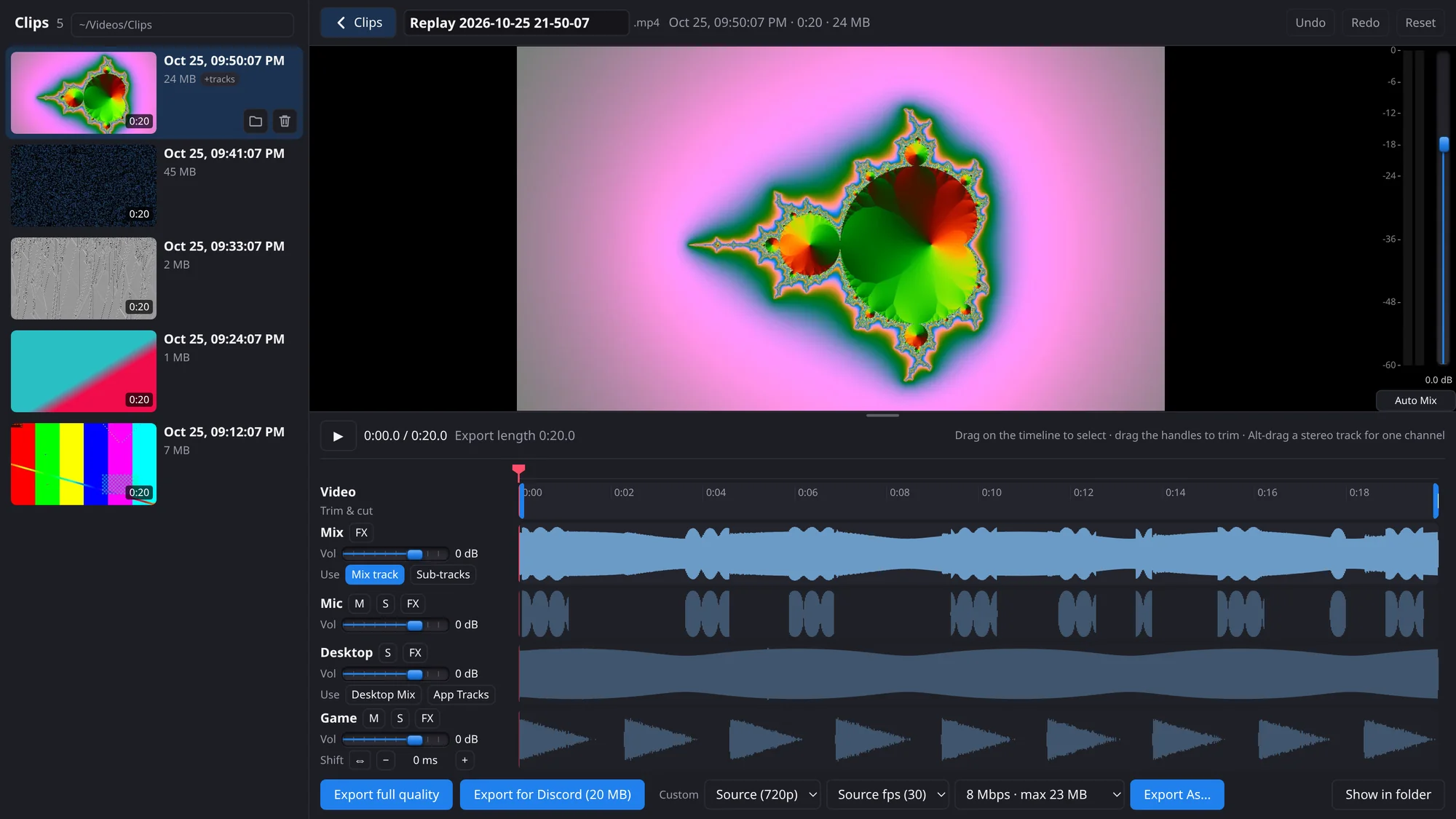
Open the editor from the tray to browse, trim and share your clips without leaving ClipEm. Edits are saved per clip and never touch the original file.
Browse every clip
All your clips, newest first, in a sidebar you can hide. Hover one to play it with sound and move across it to scrub - no need to open each file.
Trim and cut
Drag the handles to trim the start and end, cut out the boring middle, or keep only one part. Undo and redo cover every edit.
Edit each audio track
With split audio tracks on, your mic, desktop audio and individual apps are separate tracks - mute, solo, shift or change the volume of each, or of just one section.
Export for Discord
One click exports a copy sized to fit Discord's free upload limit. There are also full-quality and custom exports, with your choice of resolution, frame rate and bitrate.
How it works
Install
Run the Windows installer, or paste one command into a Linux terminal. No admin or root rights needed.
Set it up
A short setup wizard picks your screen, resolution, audio devices, clip length, quality and hotkey.
Press the hotkey
When something worth keeping happens, press it. The clip is already in your clips folder.
Questions
Is ClipEm free?
Yes. ClipEm is a free download for Windows and Linux.
Does ClipEm change my existing OBS?
No. ClipEm runs its own portable copy of OBS Studio with its own settings, kept inside the ClipEm folder. An OBS you already have installed isn't touched.
How far back can a clip go?
Anywhere from 15 seconds to 10 minutes - you pick the replay buffer length during setup, and can change it later.
Where are my clips saved?
In the folder you choose during setup. Re-running setup or updating ClipEm never removes clips.
Does it work on Linux with Wayland?
Yes - ClipEm's OBS uses PipeWire screen capture. The tray icon works on KDE Plasma, XFCE and MATE; on GNOME it needs the AppIndicator extension.
Does ClipEm update itself?
It can check for new releases each time it starts. When there is one, it asks whether to update now, at the next restart, or not at all.
Do I need a separate video editor?
No. ClipEm's clip editor (Open Clip Editor in the tray menu) trims and cuts clips, edits each audio track and exports full-quality or Discord-sized copies. Your original clips are never changed, and you can still open a clip in your own editor with one button.
Is there a macOS version?
Not at the moment - ClipEm supports Windows and Linux.